Follow the digital trail
The official description lists 52 fictional dark-net websites. Search their pages and source code for hidden keys. The internet on screen is part of the game; this guide does not send you to real dark-net services.
Field notes / file 003
Keep your clues.
Keep your nerve.
A clear briefing for Reflect Studios’ dark-net horror game, plus a private notebook for the trail you uncover.
PC game · Paid download · No verified browser edition
01 / Read the room
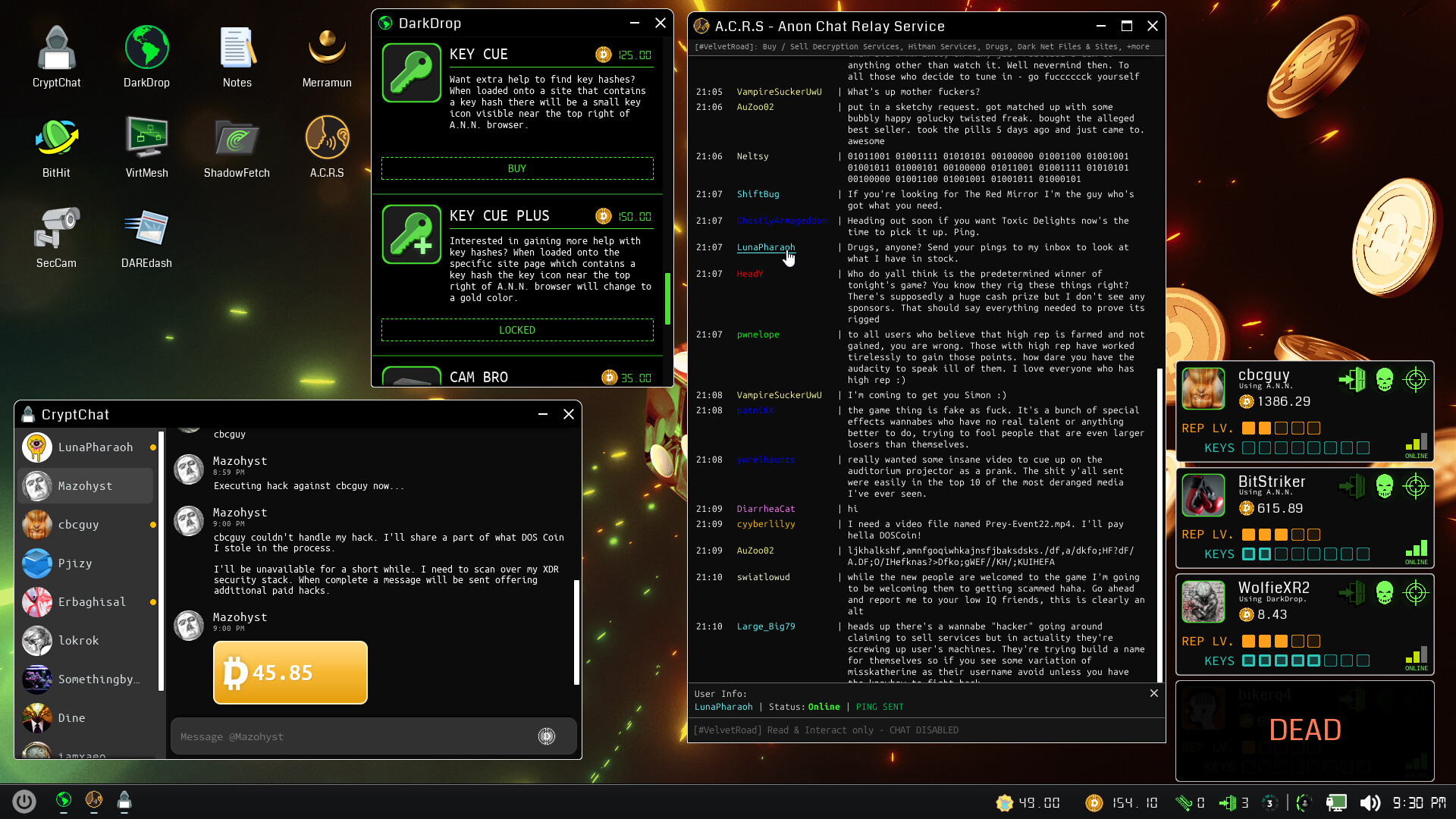
Welcome to the Game 3 is a single-player horror and strategy game. You play Simon, whose debt puts him into a dangerous competition. Your job is to assemble a puzzle while managing the people and systems that can stop you.
The official description lists 52 fictional dark-net websites. Search their pages and source code for hidden keys. The internet on screen is part of the game; this guide does not send you to real dark-net services.
Threats can reach Simon outside his computer. The developer describes choosing when to remain in place, hide, or run. Treat the computer as one part of the situation rather than the whole game.
Counter-hacking can earn DOS Coin. Firewall upgrades can prevent intrusions, with a trade-off in potential earnings. The hacking minigames involve reaction speed, typing, and puzzles; defense is a decision as well as a reflex.
Four interactive NPC competitors can buy and sell goods and services. They can interfere with your progress, just as you can interfere with theirs. Track what you observe rather than assuming every encounter will repeat.
02 / Before you install
Steam lists a 64-bit Windows 10 system, 8 GB RAM, DirectX 11, and 5 GB of available storage as minimum requirements. The CPU baseline is an Intel Core i7-6700 or AMD Ryzen 5 1600; the GPU baseline is a GTX 1650 with 4 GB or Radeon RX 570 with 4 GB.
Check the store’s complete requirements before buying. These are the publisher’s specifications, not our performance benchmark. The official listing also identifies checkpoint saving on Normal difficulty; our notebook cannot save a run, restore a checkpoint, or unlock progress.
Continue the investigation
Start with the confirmed features, then keep a record of what you find.
03 / Your field notebook
Write down what you actually find in Welcome to the Game 3. This is a blank companion notebook, not an answer database. Your notes stay in this browser; export a copy before clearing site data or changing devices.
Your first clue belongs here.
Add a label and an observation to start your own trail.
Start with a recognizable label, choose a category, and describe what you saw. “Open lead” means you still want to investigate; “Checked” only means you have reviewed your note. It is not a game completion flag. Use the search box when several observations concern the same page, and export the notebook whenever you want a readable text backup.
Nothing here scans the game, reads save files, knows where a key is hidden, or verifies an answer for you. Do not put account credentials or private information into a note. Browser storage can be removed by privacy tools or device cleanup. Exporting creates a text copy; importing and cloud sync are not available.
04 / Before you ask
The game, the store, and this notebook do different jobs. Here is what to expect from each.
We have not verified an official browser edition or an authorized playable iframe. The official game is a paid Windows download on Steam. This website provides a briefing and a separate browser-based notebook; it does not run the game.
Yes. Welcome to the Game III is the official Steam title. This independent site uses the numeral 3 to match the common spelling of the same game.
The official Steam listing we checked specifies Windows. We have not verified an official iOS or Android release. You can use this site and its notebook on a phone, but that does not make the PC game playable here.
The developer lists checkpoint saving on Normal difficulty. That is an in-game feature. Saving a note here does not create, modify, or recover a game save.
They are stored locally in this browser when storage is available. They do not sync between devices. Export a text copy before clearing browser data. In the engine’s temporary preview, storage resets when the preview reloads.
No. We are an independent fan resource. The briefing summarizes the official game listing, and the notebook holds observations you enter yourself. We do not claim to have verified a full route, every key location, or every ending.
On the record
Game facts and the screenshot on this page come from the developer’s official store listing. Our notebook instructions describe our own tool. Editorial check: .
Player correspondence
Ask a question, suggest a correction, or compare an observation. Mark story details with “Spoiler” so the next reader can choose.
Comments are reviewed before publication. They may become public. Do not include passwords, private details, or links.
The correspondence starts with you. What question did the briefing leave unanswered?